Wednesday, 1 July 2015

File Object


File Object

Java File class represents the files and directory path names in an abstract manner. 


This class is used for creation of files and directories, file searching, file deletion etc.

The File object represents the actual file/directory on the disk. There are following constructors to create a File object:
Following syntax creates a new File instance from a parent abstract pathname and a child pathname string.
File(File parent, String child);
Following syntax creates a new File instance by converting the given path name string into an abstract pathname.
File(String pathname) 
Following syntax creates a new File instance from a parent path name string and a child path name string.
File(String parent, String child) 
Following syntax creates a new File instance by converting the given file: URI into an abstract path name.
File(URI uri) 
Once you have File object in hand then there is a list of helper methods which can be used manipulate the files.
SNMethods with Description
1public String getName()
Returns the name of the file or directory denoted by this abstract pathname.
2public String getParent()
Returns the pathname string of this abstract pathname's parent, or null if this pathname does not name a parent directory.
3public File getParentFile()
Returns the abstract pathname of this abstract pathname's parent, or null if this pathname does not name a parent directory.
4public String getPath()
Converts this abstract pathname into a pathname string.
5public boolean isAbsolute()
Tests whether this abstract pathname is absolute. Returns true if this abstract pathname is absolute, false otherwise
6public String getAbsolutePath()
Returns the absolute pathname string of this abstract pathname.
7public boolean canRead()
Tests whether the application can read the file denoted by this abstract pathname. Returns true if and only if the file specified by this abstract pathname exists and can be read by the application; false otherwise.
8public boolean canWrite()
Tests whether the application can modify to the file denoted by this abstract pathname. Returns true if and only if the file system actually contains a file denoted by this abstract pathname and the application is allowed to write to the file; false otherwise.
9public boolean exists()
Tests whether the file or directory denoted by this abstract pathname exists. Returns true if and only if the file or directory denoted by this abstract pathname exists; false otherwise
10public boolean isDirectory()
Tests whether the file denoted by this abstract pathname is a directory. Returns true if and only if the file denoted by this abstract pathname exists and is a directory; false otherwise.
11public boolean isFile()
Tests whether the file denoted by this abstract pathname is a normal file. A file is normal if it is not a directory and, in addition, satisfies other system-dependent criteria. Any non-directory file created by a Java application is guaranteed to be a normal file. Returns true if and only if the file denoted by this abstract pathname exists and is a normal file; false otherwise
.
12public long lastModified()
Returns the time that the file denoted by this abstract pathname was last modified. Returns a long value representing the time the file was last modified, measured in milliseconds since the epoch (00:00:00 GMT, January 1, 1970), or 0L if the file does not exist or if an I/O error occurs.
13public long length()
Returns the length of the file denoted by this abstract pathname. The return value is unspecified if this pathname denotes a directory.
14public boolean createNewFile() throws IOException
Atomically creates a new, empty file named by this abstract pathname if and only if a file with this name does not yet exist. Returns true if the named file does not exist and was successfully created; false if the named file already exists.
15public boolean delete()
Deletes the file or directory denoted by this abstract pathname. If this pathname denotes a directory, then the directory must be empty in order to be deleted. Returns true if and only if the file or directory is successfully deleted; false otherwise.
16public void deleteOnExit()
Requests that the file or directory denoted by this abstract pathname be deleted when the virtual machine terminates.
17public String[] list()
Returns an array of strings naming the files and directories in the directory denoted by this abstract pathname.
18public String[] list(FilenameFilter filter)
Returns an array of strings naming the files and directories in the directory denoted by this abstract pathname that satisfy the specified filter.
20public File[] listFiles()
Returns an array of abstract pathnames denoting the files in the directory denoted by this abstract pathname.
21public File[] listFiles(FileFilter filter)
Returns an array of abstract pathnames denoting the files and directories in the directory denoted by this abstract pathname that satisfy the specified filter.
22public boolean mkdir()
Creates the directory named by this abstract pathname. Returns true if and only if the directory was created; false otherwise.
23public boolean mkdirs()
Creates the directory named by this abstract pathname, including any necessary but nonexistent parent directories. Returns true if and only if the directory was created, along with all necessary parent directories; false otherwise.
24public boolean renameTo(File dest)
Renames the file denoted by this abstract pathname. Returns true if and only if the renaming succeeded; false otherwise.
25public boolean setLastModified(long time)
Sets the last-modified time of the file or directory named by this abstract pathname. Returns true if and only if the operation succeeded; false otherwise.
26public boolean setReadOnly()
Marks the file or directory named by this abstract pathname so that only read operations are allowed. Returns true if and only if the operation succeeded; false otherwise.
27public static File createTempFile(String prefix, String suffix, File directory) throws IOException
Creates a new empty file in the specified directory, using the given prefix and suffix strings to generate its name. Returns an abstract pathname denoting a newly-created empty file.
28public static File createTempFile(String prefix, String suffix) throws IOException
Creates an empty file in the default temporary-file directory, using the given prefix and suffix to generate its name. Invoking this method is equivalent to invoking createTempFile(prefix, suffix, null). Returns abstract pathname denoting a newly-created empty file.
29public int compareTo(File pathname)
Compares two abstract pathnames lexicographically. Returns zero if the argument is equal to this abstract pathname, a value less than zero if this abstract pathname is lexicographically less than the argument, or a value greater than zero if this abstract pathname is lexicographically greater than the argument.
30public int compareTo(Object o)
Compares this abstract pathname to another object. Returns zero if the argument is equal to this abstract pathname, a value less than zero if this abstract pathname is lexicographically less than the argument, or a value greater than zero if this abstract pathname is lexicographically greater than the argument.
31public boolean equals(Object obj)
Tests this abstract pathname for equality with the given object. Returns true if and only if the argument is not null and is an abstract pathname that denotes the same file or directory as this abstract pathname.
32public String toString()
Returns the pathname string of this abstract pathname. This is just the string returned by the getPath() method.
Example,

import java.io.File;

public class FileDemo {
   public static void main(String[] args) {
      
      File f = null;
      String[] strs = {"test1.txt", "test2.txt"};
      try{
         // for each string in string array 
         for(String s:strs )
         {
            // create new file
            f= new File(s);
            
            // true if the file is executable
            boolean bool = f.canExecute();
            
            // find the absolute path
            String a = f.getAbsolutePath(); 
            
            // prints absolute path
            System.out.print(a);
            
            // prints
            System.out.println(" is executable: "+ bool);
         } 
      }catch(Exception e){
         // if any I/O error occurs
         e.printStackTrace();
      }
   }
}
Consider there is an executable file test1.txt and another file test2.txt is non executable in current directory, Let us compile and run the above program, this will produce the following result:
test1.txt is executable: true
test2.txt is executable: false

Converting Byte Streams to Character Streams


Converting Byte Streams to Character Streams


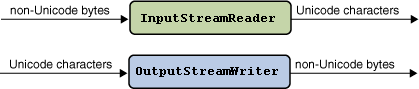
  • The java.io package provides classes that allow you to convert between Unicode character streams and byte streams of non-Unicode text. 
  • With the InputStreamReader class, you can convert byte streams to character streams. 
  • You use the OutputStreamWriter class to translate character streams into byte streams. 

The following figure illustrates the conversion process:

This figure represents the conversion process

When you create InputStreamReader and OutputStreamWriter objects, you specify the byte encoding that you want to convert.
 For example, to translate a text file in the UTF-8 encoding into Unicode, you create anInputStreamReader as follows:

FileInputStream fis = new FileInputStream("test.txt");
InputStreamReader isr = new InputStreamReader(fis, "UTF8");

If you omit the encoding identifier, InputStreamReader and OutputStreamWriter rely on the default encoding. 
You can determine which encoding an InputStreamReader or OutputStreamWriter uses by invoking the getEncoding method, as follows:

InputStreamReader defaultReader = new InputStreamReader(fis);
String defaultEncoding = defaultReader.getEncoding();

The example that follows shows you how to perform character-set conversions with the InputStreamReader and OutputStreamWriter classes. 

The full source code for this example is in StreamConverter.java. 

This program displays Japanese characters. Before trying it out, verify that the appropriate fonts have been installed on your system. If you are using the JDK software that is compatible with version 1.1, make a copy of thefont.properties file and then replace it with the font.properties.ja file.

The StreamConverter program converts a sequence of Unicode characters from a String object into a FileOutputStream of bytes encoded in UTF-8. 

The method that performs the conversion is called writeOutput:

static void writeOutput(String str) {
    try {
        FileOutputStream fos = new FileOutputStream("test.txt");
        Writer out = new OutputStreamWriter(fos, "UTF8");
        out.write(str);
        out.close();
    } 
    catch (IOException e) {
        e.printStackTrace();
    }
}
The readInput method reads the bytes encoded in UTF-8 from the file created by the writeOutput method. 

An InputStreamReader object converts the bytes from UTF-8 into Unicode and returns the result in a String. The readInput method is as follows:

static String readInput() {
    StringBuffer buffer = new StringBuffer();
    try {
        FileInputStream fis = new FileInputStream("test.txt");
        InputStreamReader isr = new InputStreamReader(fis, "UTF8");
        Reader in = new BufferedReader(isr);
        int ch;
        while ((ch = in.read()) > -1) {
            buffer.append((char)ch);
        }
        in.close();
        return buffer.toString();
    } 
    catch (IOException e) {
        e.printStackTrace();
        return null;
    }
}
The main method of the StreamConverter program invokes the writeOutput method to create a file of bytes encoded in UTF-8. The readInput method reads the same file, converting the bytes back into Unicode. Here is the source code for the main method:

public static void main(String[] args) {
    String jaString = new String("\u65e5\u672c\u8a9e\u6587\u5b57\u5217");
    writeOutput(jaString); 
    String inputString = readInput();
    String displayString = jaString + " " + inputString;
    new ShowString(displayString, "Conversion Demo");
}
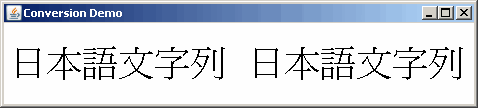
The original string (jaString) should be identical to the newly created string (inputString). To show that the two strings are the same, the program concatenates them and displays them with a ShowString object. TheShowString class displays a string with the Graphics.drawString method. The source code for this class is in ShowString.java. When the StreamConverter program instantiates ShowString, the following window appears. 

The repetition of the characters displayed verifies that the two strings are identical:

This is a screens hot of the StreamConverter program


Example,

import java.io.*;
import java.util.*;

public class StreamConverter {

   static void writeOutput(String str) {

       try {
           FileOutputStream fos = new FileOutputStream("test.txt");
           Writer out = new OutputStreamWriter(fos, "UTF8");
           out.write(str);
           out.close();
       } catch (IOException e) {
           e.printStackTrace();
       }
   }

   static String readInput() {

      StringBuffer buffer = new StringBuffer();
      try {
          FileInputStream fis = new FileInputStream("test.txt");
          InputStreamReader isr = new InputStreamReader(fis, "UTF8");
          Reader in = new BufferedReader(isr);
          int ch;
          while ((ch = in.read()) > -1) {
             buffer.append((char)ch);
          }
          in.close();
          return buffer.toString();
      } catch (IOException e) {
          e.printStackTrace();
          return null;
      }
   }

   public static void main(String[] args) {

      String jaString  = new String("\u65e5\u672c\u8a9e\u6587\u5b57\u5217");
      writeOutput(jaString);
      String inputString = readInput();
      String displayString = jaString + " " + inputString;
      new ShowString(displayString, "Conversion Demo");
   }

}

Overview of streams


Overview


  1. A stream can be defined as a sequence of data. 
  2. Input Stream is used to read data from a source and the Output Stream is used for writing data to a destination.
  3. Java provides strong but flexible support for I/O related to Files and networks.

Byte stream is defined by using two abstract class at the top of hierarchy, they are Input Stream and Output Stream.
Java byte streams are used to perform input and output of 8-bit bytes. Though there are many classes related to byte streams but the most frequently used classes are ,FileInputStream and FileOutputStream
byte stream classification
These two abstract classes have several concrete classes that handle various devices such as disk files, network connection etc.

Some important Byte stream classes.

Stream classDescription
BufferedInputStreamUsed for Buffered Input Stream.
BufferedOutputStreamUsed for Buffered Output Stream.
DataInputStreamContains method for reading java standard datatype
DataOutputStreamAn output stream that contain method for writing java standard data type
FileInputStreamInput stream that reads from a file
FileOutputStreamOutput stream that write to a file.
InputStreamAbstract class that describe stream input.
OutputStreamAbstract class that describe stream output.
PrintStreamOutput Stream that contain print() and println() method
These classes define several key methods. Two most important are
  1. read() : reads byte of data.
  2. write() : Writes byte of data.
Example,
import java.io.*;

public class CopyFile {
   public static void main(String args[]) throws IOException
   {
      FileInputStream in = null;
      FileOutputStream out = null;

      try {
         in = new FileInputStream("input.txt");
         out = new FileOutputStream("output.txt");
         
         int c;
         while ((c = in.read()) != -1) {
            out.write(c);
         }
      }finally {
         if (in != null) {
            in.close();
         }
         if (out != null) {
            out.close();
         }
      }
   }
}

Character Stream Classes

Character stream is also defined by using two abstract class at the top of hierarchy, they are Reader and Writer.
Java Byte streams are used to perform input and output of 8-bit bytes, where as JavaCharacter streams are used to perform input and output for 16-bit unicode.
 Though there are many classes related to character streams but the most frequently used classes are ,FileReader and FileWriter.
character stream classification
These two abstract classes have several concrete classes that handle unicode character.

Some important Character stream classes.

Stream classDescription
BufferedReaderHandles buffered input stream.
BufferedWriterHandles buffered output stream.
FileReaderInput stream that reads from file.
FileWriterOutput stream that writes to file.
InputStreamReaderInput stream that translate byte to character
OutputStreamReaderOutput stream that translate character to byte.
PrintWriterOutput Stream that contain print() and println() method.
ReaderAbstract class that define character stream input
WriterAbstract class that define character stream output

Reading Console Input

We use the object of BufferedReader class to take inputs from the keyboard.
BufferedReader class explanation

Reading Characters

read() method is used with BufferedReader object to read characters. As this function returns integer type value has we need to use typecasting to convert it into char type.
int read() throws IOException
Below is a simple example explaining character input.
class CharRead
{
 public static void main( String args[])
 {
  BufferedReader br = new Bufferedreader(new InputstreamReader(System.in));
  char c = (char)br.read();       //Reading character  
 }
}

Reading Strings

To read string we have to use readLine() function with BufferedReader class's object.
String readLine() throws IOException

Program to take String input from Keyboard in Java

import java.io.*;
class MyInput
{
 public static void main(String[] args)
 {
  String text;
  InputStreamReader isr = new InputStreamReader(System.in);
  BufferedReader br = new BufferedReader(isr);
  text = br.readLine();          //Reading String  
  System.out.println(text);
 }
}

Program to read from a file using BufferedReader class

import java. Io *;
class ReadTest
{
 public static void main(String[] args)
 {
  try 
  {
   File fl = new File("d:/myfile.txt");
   BufferedReader br = new BufferedReader(new FileReader(fl)) ;
   String str;
   while ((str=br.readLine())!=null)
   {
    System.out.println(str);
   }
   br.close();
   fl.close();
  }
  catch (IOException  e)
  { e.printStackTrace(); }
 }
}

Program to write to a File using FileWriter class

import java. Io *;
class WriteTest
{
 public static void main(String[] args)
 {
  try 
  {
   File fl = new File("d:/myfile.txt");
   String str="Write this string to my file";
   FileWriter fw = new FileWriter(fl) ;
   fw.write(str);
   fw.close();
   fl.close();
  }
  catch (IOException  e)
  { e.printStackTrace(); }
 }
}

Example


import java.io.*;

public class CopyFile {
   public static void main(String args[]) throws IOException
   {
      FileReader in = null;
      FileWriter out = null;

      try {
         in = new FileReader("input.txt");
         out = new FileWriter("output.txt");
         
         int c;
         while ((c = in.read()) != -1) {
            out.write(c);
         }
      }finally {
         if (in != null) {
            in.close();
         }
         if (out != null) {
            out.close();
         }
      }
   }
}

Byte vs characters streams,


Monday, 29 June 2015

Wildcards


Java Generic's wildcards is a mechanism in Java Generics aimed at making it possible to cast a collection of a certain class, e.g A, to a collection of a subclass or superclass of A. This text explains how.
Here is a list of the topics covered:

    The Basic Generic Collection Assignment Problem

    Imagine you have the following class hierarchy:
    public class A { }
    public class B extends A { }
    public class C extends A { }
    
    The classes B and C both inherit from A.
    Then look at these two List variables:
    List<A> listA = new ArrayList<A>();
    List<B> listB = new ArrayList<B>();
    
    Can you set listA to point to listB ? or set listB to point to listA? In other words, are these assignments valid:
    listA = listB;
    
    listB = listA;
    
    The answer is no in both cases. Here is why:
    In listA you can insert objects that are either instances of A, or subclasses of A (B and C). If you could do this:
    List<B> listB = listA;
    
    then you could risk that listA contains non-B objects. When you then try to take objects out of listB you could risk to get non-B objects out (e.g. an A or a C). That breaks the contract of the listB variable declaration.
    Assigning listB to listA also poses a problem. This assignment, more specifically:
    listA = listB;
    
    If you could make this assignment, it would be possible to insert A and C instances into the List<B> pointed to by listB. You could do that via the listA reference, which is declared to be of List<A>. Thus you could insert non-B objects into a list declared to hold B (or B subclass) instances.

    When are Such Assignments Needed?

    The need for making assignments of the type shown earlier in this text arises when creating reusable methods that operate on collections of a specific type.
    Imagine you have a method that processes the elements of a List, e.g. print out all elements in the List. Here is how such a method could look:
    public void processElements(List<A> elements){
       for(A o : elements){
          System.out.println(o.getValue());
       }
    }
    
    This method iterates a list of A instances, and calls the getValue() method (imagine that the class A has a method called getValue()).
    As we have already seen earlier in this text, you can not call this method with a List<B> or a List<C> typed variable as parameter.

    Generic Wildcards

    The generic wildcard operator is a solution to the problem explained above. The generic wildcards target two primary needs:
    • Reading from a generic collection
    • Inserting into a generic collection
    There are three ways to define a collection (variable) using generic wildcards. These are:
    List<?>           listUknown = new ArrayList<A>();
    List<? extends A> listUknown = new ArrayList<A>();
    List<? super   A> listUknown = new ArrayList<A>();
    
    The following sections explain what these wildcards mean.

    The Unknown Wildcard

    List<?> means a list typed to an unknown type. This could be a List<A>, a List<B>, a List<String> etc.
    Since the you do not know what type the List is typed to, you can only read from the collection, and you can only treat the objects read as being Object instances. Here is an example:
    public void processElements(List<?> elements){
       for(Object o : elements){
          System.out.println(o);
       }
    }
    
    The processElements() method can now be called with any generic List as parameter. For instance aList<A>, a List<B>, List<C>, a List<String> etc. Here is a valid example:
    List<A> listA = new ArrayList<A>();
    
    processElements(listA);
    

    The extends Wildcard Boundary

    List<? extends A> means a List of objects that are instances of the class A, or subclasses of A (e.g. B and C).
    When you know that the instances in the collection are of instances of A or subclasses of A, it is safe to read the instances of the collection and cast them to A instances. Here is an example:
    public void processElements(List<? extends A> elements){
       for(A a : elements){
          System.out.println(a.getValue());
       }
    }
    
    You can now call the processElements() method with either a List<A>, List<B> or List<C>. Hence, all of these examples are valid:
    List<A> listA = new ArrayList<A>();
    processElements(listA);
    
    List<B> listB = new ArrayList<B>();
    processElements(listB);
    
    List<C> listC = new ArrayList<C>();
    processElements(listC);
    
    The processElements() method still cannot insert elements into the list, because you don't know if the list passed as parameter is typed to the class A, B or C.

    The super Wildcard Boundary

    List<? super A> means that the list is typed to either the A class, or a superclass of A.
    When you know that the list is typed to either A, or a superclass of A, it is safe to insert instances of A or subclasses of A (e.g. B or C) into the list. Here is an example:
    public static void insertElements(List<? super A> list){
        list.add(new A());
        list.add(new B());
        list.add(new C());
    }
    
    All of the elements inserted here are either A instances, or instances of A's superclass. Since both B and C extend A, if A had a superclass, B and C would also be instances of that superclass.
    You can now call insertElements() with either a List<A>, or a List typed to a superclass of A. Thus, this example is now valid:
    List<A>      listA      = new ArrayList<A>();
    insertElements(listA);
    
    List<Object> listObject = new ArrayList<Object>();
    insertElements(listObject);
    
    
    The insertElements() method cannot read from the list though, except if it casts the read objects toObject. The elements already present in the list when insertElements() is called could be of any type that is either an A or superclass of A, but it is not possible to know exactly which class it is. However, since any class eventually subclass Object you can read objects from the list if you cast them to Object. Thus, this is valid:
    Object object = list.get(0);
    
    But this is not valid:

    A object = list.get(0);